I added offline voice typing to my Qin F22
I’ve been slowly turning my Qin F22 (non-Pro), a small Android phone with a physical number pad, into my ultimate dumbphone.
First, I worked out what to take out. I blocked access to the browser and Play Store to make it harder to get sidetracked.
Now I’m working out what to put back in. Dictation was high on the list: speaking a message helps me finish what I’m doing and put the phone down sooner.
I wasn’t happy with Google’s voice typing in Gboard. I wanted a free alternative that would let me keep using the T9 keyboard, which I really like.
Then I found Whistle, a speech-to-text model from Cactus Compute. The model file is only 16.9 MB, so I thought it might be possible to run it on my phone with its 2 GB of RAM.
I forked Traditional T9 v64.0 by sspanak and built Whistle into the keyboard. After some experimenting locally with Codex, I got it working. I’ve called it TT9 Whistle.
How it works
You can dictate into the field you’re typing in, then edit the text before sending.
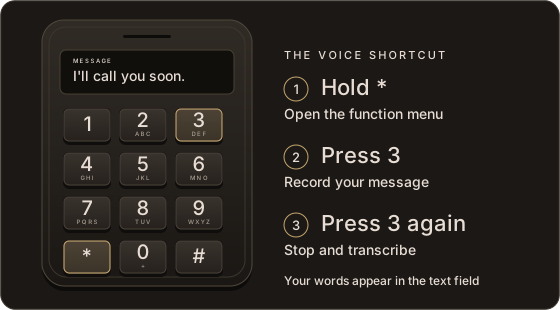
Speech recognition runs on the phone by default. The bundled model needs no account or internet connection, and your audio stays on the device.
The app also has an experimental cloud mode for a compatible API service and your own API key. It hasn’t been fully tested on the phone, and cost depends on the service. Audio is only sent there if you select that mode. TT9’s original system voice input is also available.
How fast is it?
In my recorded-audio tests on the F22, using the default Balanced setting and four processor threads:
| Recording | Time to transcribe |
|---|---|
| A short message: 11 words, about 4 seconds of audio | About 1 second |
| A longer passage: 71 words, about 20 seconds of audio | About 6 seconds |
Those are median times from three runs of each generated recording, from starting the transcriber to getting the text back.
Depth 4, labelled Balanced, gave the best balance of speed and accuracy in our tests. Depth 8 wasn’t more accurate, took about 1.5 times longer on the phone, and sometimes lost punctuation on longer recordings.
Languages and limits
- Recordings stop at 60 seconds.
- Unusual names get misheard. Under Voice input → Words to expect, you can enter hint words separated by commas. This helped with some unusual single-word names in our tests.
- The speech model supports English, German, French, Spanish, Italian, Dutch and Polish.
- To keep this build lightweight, the TT9 typing keyboard comes with only the English dictionary. You can download other typing dictionaries, then use them offline.
Trying it yourself
I’ve packaged ready-to-install test builds on my GitHub, with the speech model included. You don’t need to build the app yourself. I built and tested it on my 32-bit Qin F22; other phones still need testing.
If you have a 64-bit ARM Android phone, download the same APK. It includes both versions of the speech engine. Start with the normal app installation; you don’t need to root the phone for that route. It requires Android 7 or newer.
You can point your AI agent at the repository and ask:
Read INSTALL.md, check whether my phone is compatible, and help me install TT9 Whistle using the ready-made download.
Some phones, including my F22, block normal app installs. The Magisk download was prepared for my 32-bit F22 and needs an already rooted phone. Unlocking or rooting another phone is separate work that varies by model. I hope to share that guide separately.
This is a test build of my own fork, not an official Traditional T9 release. It installs alongside the original keyboard.
Credits for the needle speech engine, licences and file hashes are in THIRD-PARTY.md.
If you try it on another keypad phone, I’d be interested in how it works, especially with everyday speech.