On device LLM Case Note system
TL;DR
A local, privacy-first system for automating clinical documentation without losing the reflective work that matters.
How it works
- Record a voice memo immediately after the session (no AI in the room)
- Transcribe on-device using Mac Whisper
- Process through LM Studio with a prompt chain
- Review the structured case note in your own voice
Why local?
- Privacy: Client data never leaves your machine
- Therapeutic integrity: The AI formats your reflections, doesn’t replace them
- No “AI in the room”: Avoid the permission friction of live recording
Tech stack
- Python + AppleScript
- LM Studio (local LLM inference)
- Obsidian vault for client management
- Gemma 3 27B for processing
The details
On-Device Case Notes
A privacy-first experiment in clinical documentation
Following my graduation from a Masters in Counselling, I took on a summer experiment exploring how I could automate Case Notes using on-device LLMs.
The motivation came from reading Rishikesh Sreehari’s “File over App” blog, which emphasised the inherent worth of maintaining one’s own files in universal file formats, and listening to Geoffrey Lit talk about “Malleable Technology” on the Dialectic podcast.
I would be making my first personalised piece of software. What would it be? To add functionality to reduce the paperwork side of Case Notes, while maintaining the valuable reflective skill that writing case notes provides. This led me to develop a specific pipeline:
- Record my case note as an audio file
- Extract a transcription and process it through a prompt chain
- Structure the information into a template format, in my own voice and style
- Review the finished note
I set up a Client Management System in Obsidian, essentially .md files in folders with strict naming conventions, booted up LMStudio, and got to work using A.I. to write some python script to do the case note processing.
The Problem I Was Trying to Solve
As a therapist, documentation eats 10-15% of session-related time. I looked at the existing tools—many record the session live and then wham, you get a case note.
I tried that path in my mind and hit a wall. The verbalising is where the compounding happens for my memory. The shift from recollection to verbating—that context switch—is where the clinical synthesis lives. I didn’t want to automate the thought; I wanted to automate the formatting.
This preserves the cognitive benefit I wasn’t willing to lose, while reducing the administrative friction.
I also had concerns about privacy. Server-side LLMs can carry an element of risk, so keeping data on my own file system felt like a reduction of those risks.
Then there’s the “AI in the room” feeling. When you ask “Do you mind if an AI records this for case note purposes?”, something tightens. I’ve felt that myself, and opted out when asked. By orientating the AI’s role from recorder to editor of my own reflections, I hoped to sidestep that and maintain the integrity of the therapeutic relationship.
Ultimately I wanted to explore: Can local, on-device AI reduce the admin burden while keeping the work private, human, ethical and grounded? For now I’ll share what I built; the open questions about explicit permission versus informed consent can be answered another time.
The Actual System
The code and setup instructions are available on GitHub.
Technical Aspects
Requirements:
- macOS (for the Quick Action integration)
- Python 3.8+
- LM Studio running locally
requestsandPyYAMLlibraries
Tested with:
- Model: Gemma 3 27B (via LM Studio)
- Hardware: MacBook Pro M1 Max, 32GB RAM
Configuration:
Edit config.yaml to point at your LM Studio instance (typically http://localhost:1234). The prompts live in Prompts/ as plain text files—modify them to match your clinical voice.
Folder Structure
Here’s how I organise client files within my encrypted Obsidian vault:
/Volumes/Clients/                 # Encrypted MacOS volume
└── Chester Burnett/              # Template I copy for each new client
    ├── Documents/                # Intake forms, assessments, etc.
    │   └── ...
    ├── Representations/          # Client-created content (art, diagrams)
    │   ├── S1 - Representation.md
    │   └── S2 - Representation.md
    ├── Transcriptions/           # Voice-recorded summaries
    │   ├── S1 - Transcription.md # ← Input (Voice recorded Case Note)
    │   └── S2 - Transcription.md
    ├── S1 - Case Note.md         # ← Output (AI structured Case Note)
    └── S2 - Case Note.md
My Actual Workflow
-
Do the session (no recording, no AI present)
-
Immediately after: Voice-record a rough summary using Mac Whisper (on-device transcription)
-
Drop the transcription into my encrypted Obsidian client vault on a separate volume (password-protected beyond the computer login). That is copied into “S1 - Transcription.md”
-
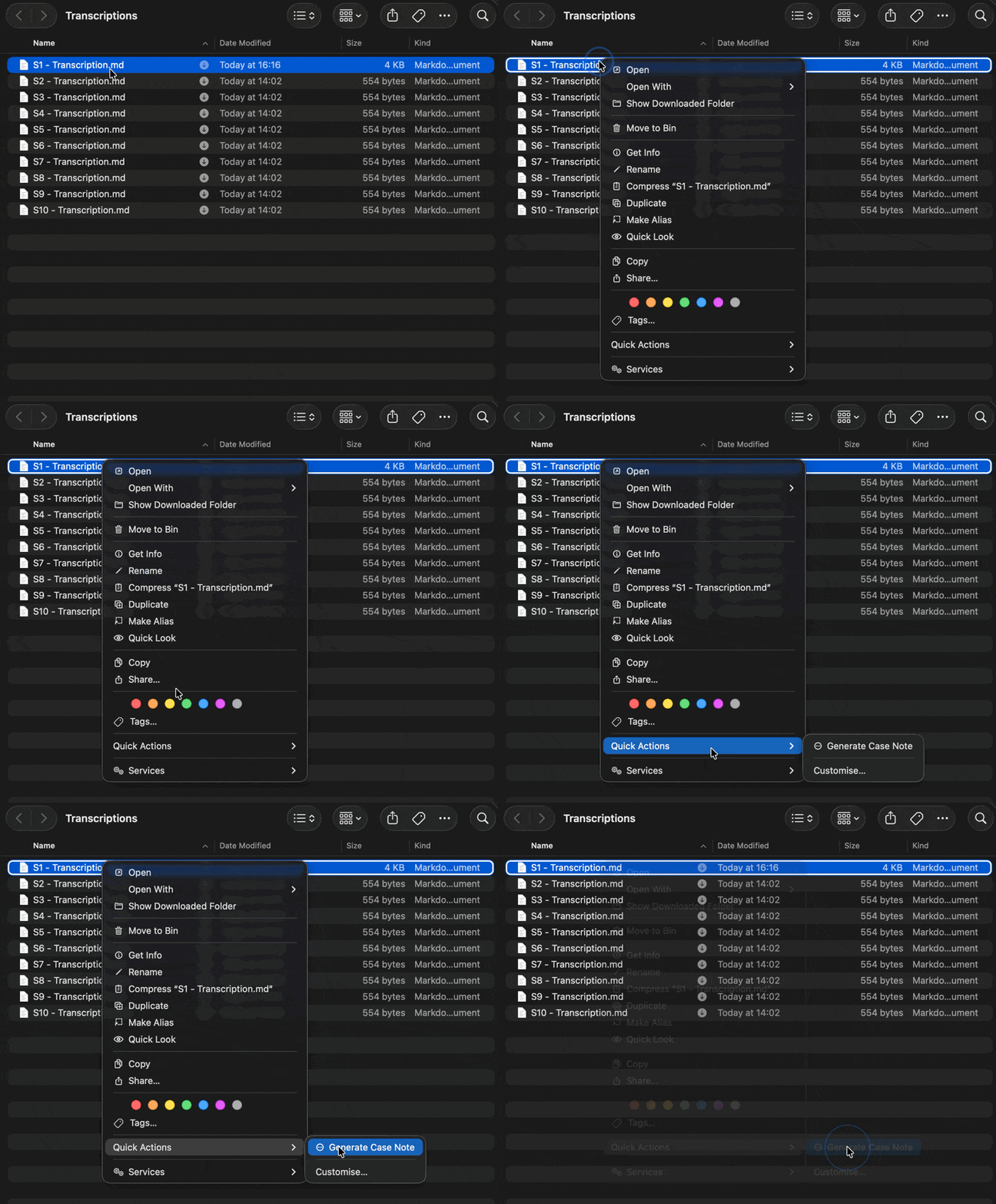
Right-click the “S1 - Transcription.md” → Quick Actions → Generate Case Note (this script runs a prompt chain via LM Studio) via Apple Script and saves the output directly into the corresponding “S1 - Case Note.md” to the correct subfolder.
-
Review and edit the structured case note to my liking.
The ideal setup would be a separate computer entirely for this work. For now, the encrypted volume is “good enough” for my privacy standards.
Prompting
The system uses a 2-step prompt chain.
- Step one > main body > creates “S1 - Transcription.md”.
- Step two > final dot points > appends output to “S1 - Transcription.md”.
I found chunking down the prompts to do specific tasks helped improve the quality of output, prompt adherence and speed. If I wanted more specific elements in future experiment I would use this stepping approach further.
The process took about five different variations of prompts before it landed in territory I found acceptable for my context and tone. You’d need to tailor yours to your own voice.
The prompts live in the Prompts/ directory in the GitHub repository.
What I Learned
What I’m Not Automating
I’ve been asking myself what should AI handle and what must stay human. I’ve been sitting with this since writing about Social Mediation and AI.
The answer I keep landing on. AI can manage the formatting. Not the reflecting. The structure. Not the relationship.
Speaking the session out loud. Hearing my own words. I want AI to speed up what comes after. The administrative slog that pulls me out of clinical headspace.
The Joy of Building
Building my first piece of tailored software felt like using ChatGPT for the first time. A door opened. Six months ago I didn’t know what an IDE was, never committed to git, never ran a Python script. Now I have a development workflow and am comfortable in the CLI.
The gap between “not a coder” and “can build tools” is smaller than the industry wants you to believe.
The Vision vs. The Reality
Could I build a full client management system on device? I think so. Scheduling. Intake. Notes. Billing. All local LLMs. File Over App all the way down. It’s possible. Though it would take a lot of work and I’m happy to have taken the experiment.
Real software takes teams though. Iterations. Years. Great tools come from deep domain expertise plus technical craft. I know what I want as a clinician. I’m still learning how to build it.
So for now I’m happy with my small Malleable tool.
License: MIT — use freely, modify, share.
Contact: hello@maxmilne.com
More context: AI and Privacy in Therapeutic Work
How this was made: This code was “vibe coded”—written through conversation with AI assistants (Roo Code and Claude Code). My contribution is the structure and prompt chains, which I hand-wrote and tested against my preferred clinical outcomes. The AI handled the Python syntax. I have no intention of becoming a software engineer—I’m using AI as a tool to think through problems and build working prototypes.
Built by a therapist using AI tools, not a coder learning therapy. Expect rough edges and thoughtful intentions.